


Fund Your Account on the ICROWN Deposit Page
A Guide to Depositing Funds into Your ICROWN Account
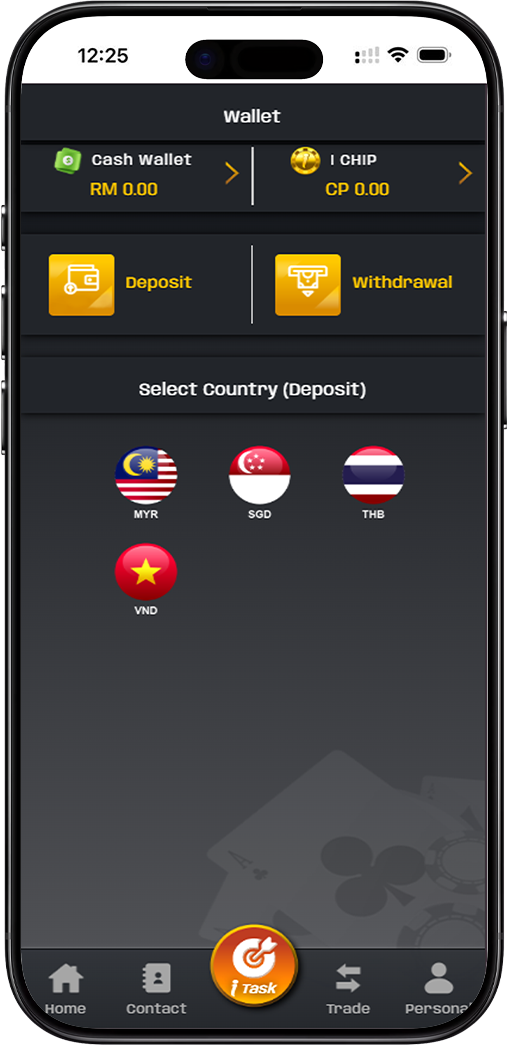
The ICROWN deposit page provides a secure and user-friendly interface to add funds to your cash wallet. With support for multiple currencies and a variety of local payment methods including bank transfers, popular e-wallets, and PIN-based top-ups, funding your account is convenient and fast. This guide walks you through the process.
Step-by-Step Guide to Making an ICROWN Deposit
Step 1: Access the Deposit Section and Select Currency
Log into your ICROWN account and navigate to the wallet or cashier section. Click on the 'Deposit' button. You will first be prompted to select your transaction currency, such as MYR (Malaysian Ringgit), SGD, THB, or VND, based on your region.
Step 2: Choose Your Preferred Deposit Method
ICROWN offers several trusted payment channels. You will see options like: - Bank Transfer: Direct transfer to a provided company bank account (e.g., Maybank, CIMB, Public Bank). - E-Wallets: Instant top-up via Touch 'n Go. - Online Banking Gateways: Services like DgPay or BigPay that connect directly to your bank. - PIN-Based Top-Ups: Services like PINLAB7 using mobile operator PINs (Celcom, Digi, Maxis, U Mobile).
Step 3: Enter Deposit Amount and Review Limits
After selecting a method, enter the amount you wish to deposit. Pay close attention to the minimum and maximum limits displayed for your chosen method, as they vary: - Bank Transfer/E-Wallet (e.g., DgPay): Min MYR 30.00, Max up to MYR 30,000.00 per transaction. - Touch 'n Go: Min MYR 20.00, Max up to MYR 200,000.00. - PIN Top-Up (PINLAB7): Min MYR 5.00, Max MYR 500.00.
Step 4: Verify Details and Confirm Transaction
A critical security step: always verify the recipient details (like account name and number for bank transfers) provided by ICROWN on the screen. For PIN or e-wallet methods, ensure you are on the official payment page. Once confirmed, click the 'Confirm' button to proceed. You will then be redirected to complete the payment via your bank's portal, e-wallet app, or by entering a PIN.
Understanding ICROWN Deposit Channels and Limits
Different methods cater to different needs, from small instant top-ups to larger transfers. Knowing the specifics helps you choose the best option.
Bank Transfers and Online Banking (DgPay, BigPay)
This method is ideal for larger deposits. You will be provided with ICROWN's official bank account details. After making the transfer from your bank account or via an online banking gateway, you may need to upload the receipt for verification. Processing time can vary.
E-Wallets and Instant Payment (Touch 'n Go)
For speed and convenience, e-wallets like Touch 'n Go offer near-instant processing. The funds are typically credited to your ICROWN cash wallet within minutes after you authorize the payment in your e-wallet app.
Mobile PIN Top-Ups (PINLAB7)
This method allows for small, quick deposits using your mobile credit or prepaid PINs from operators like Celcom, Digi, Maxis, and U Mobile. It's convenient for players who prefer not to use bank accounts or e-wallets directly.
Security and Verification for ICROWN Deposits
ICROWN prioritizes the security of your transactions. Always ensure you are depositing to the correct, officially displayed account details. The platform includes disclaimers urging users to verify information, as the company is not responsible for losses due to transfers to incorrect accounts.
Add Funds Securely and Start Playing on ICROWN
Choose from a variety of fast and secure deposit methods tailored for your convenience. Review the limits, follow the steps, and fund your ICROWN cash wallet to access all games.